Wednesday, August 28, 2019

Python-environment-for-deep-learning-in-windows

Python is increasingly becoming a popular programming language for machine learning and deep learning. If you want to use python for training a deep neural network, GPU is preferable rather CPU. This article explains the setting up python environment for deep learning (GPU), especially using Anaconda. Anaconda is a python distribution for scientific computing and machine learning. Follow the below steps to set up the environment.

1. Install Anaconda

Anaconda distribution is available for Windows, Linux, and Mac operating systems. Download the suitable package using the following link : Download Anaconda. After downloading the anaconda distribution, you just execute the setup file and follow the instructions in the wizard.

2. Update Anaconda

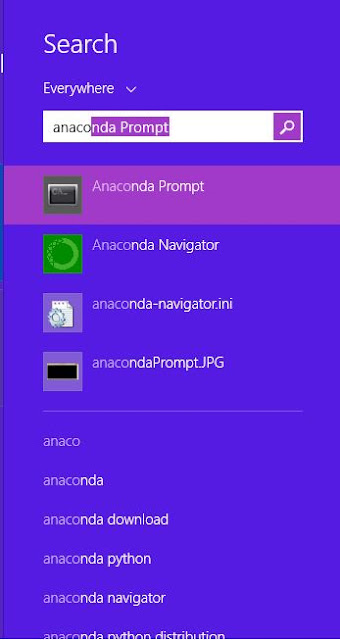
After installing Anaconda, open anaconda prompt. (go to start -> search for anaconda prompt as shown below.)

Anaconda prompt looks like command prompt. there execute following two commands. (see the below figure)
conda update conda
conda update --all


3. CUDA Tool kit and CuDNN installation

After successful updation of Anaconda distribution, you have to install two softwares : (i) CUDA Tool Kit (2) CuDNN. It is note that you have to install compatible softwares based on your OS and GPU. Please follow the links for more information. CUDA toolkit Download CuDNN

4. CuDNN path setting using environment variable

Wednesday, December 5, 2018

Convolutional-Neural-Network-using-keras

In this article, I explain the implementation of Convolutional Neural Network (CNN) using Keras frame work in python. Keras is a high level neural network API to build deep learning models. Now a days, deep learning models have achieved promising results in many tasks in the field of computer vision. CNN is a kind of deep learning model and achieved promising results in image classification tasks. In other words, CNN acts as a powerful image classifier. This article explains the implementation of CNN using keras for hand written digit classification task. Remember, deep networks are the data driven models, i.e., more data is needed for training a deep neural network. For my explanation, I am using MNIST dataset for the hand written digit classification task.

About MNIST dataset:

This dataset contains 60000, 10000 instances in the Training and Testing sets respectively. The following code snippet loads the MNIST dataset in keras. The variables data_train and data_test contains data instances of digits in training and testing sets, where as label_train and label_test stores the labels of training and testing data instances.

#load training and testing data
from keras.datasets import mnist
(data_train, label_train), (data_test, label_test) = mnist.load_data()

We can view the dimensions of variables using the following python code snippet.

#printing dimensions of variables
print(data_train.shape,data_test.shape)

output of the above code snippet: (60000, 28, 28) (10000, 28, 28) From the above output, we have to understand that the training instances are 60000 and testing instances are 10000 respectively. Each data instance (image) dimension is 28 x 28, i.e., training and testing data instances are gray scale images. The following code snippet will be helpful to visualize the images in training and testing sets. It will display four random images in training set.

#displaying the random digits
rand1 = random.randint(1,60000)
rand2 = random.randint(1,60000)
rand3 = random.randint(1,60000)
rand4 = random.randint(1,60000)
cv2.imshow('digit',data_train[rand1])
cv2.waitKey(500)
cv2.imshow('digit',data_train[rand2])
cv2.waitKey(500)
cv2.imshow('digit',data_train[rand3])
cv2.waitKey(500)
cv2.imshow('digit',data_train[rand4])
cv2.waitKey(200)

Since we are working with gray scale images, it is necessary to reshape as explained in following code snippet. In other words, we have to reshape the 28 x 28 images into 28 x 28 x 1 images.

#reshape training and testing data to train and test model
data_train = data_train.reshape(60000,28,28,1)
data_test = data_test.reshape(10000,28,28,1)

In general, we are using class labels are integers (1,2,3,...). It is necessary to convert integers into binary class matrix (i.e. called as one hot encoding). The following code converts integer class labels into binary class matrix labels.

from keras.utils import to_categorical
#one-hot encoding of training and testing labels
y_train = to_categorical(label_train)
y_test = to_categorical(label_test)

Now, this is time for designing CNN for classification task. Here, I have chosen three convolution layers and each layer is followed by activation layer RELU. Then, one fully connected layer and softmax layers are added at the end for classification tasks.

from keras.models import Sequential
from keras.layers import Dense, Conv2D, Flatten
#create model
model = Sequential()
#add model layers
model.add(Conv2D(64, kernel_size=3, activation='relu', input_shape=(28,28,1)))
model.add(Conv2D(32, kernel_size=3, activation='relu'))
model.add(Flatten())
model.add(Dense(10, activation='softmax'))

Now, we have to compile the model to measure the model performance as shown below and then training the model with the chosen options.

#compile model 
model.compile(optimizer='adam', loss='categorical_crossentropy', metrics=['accuracy'])

#training the model
model.fit(data_train, y_train, validation_data=(data_test, y_test),  epochs=1)


with the single epoch, we got validation accuracy on MNIST dataset is 97.93. This is great. By increasing number of epochs, accuracy may increase.
output:
loss: 0.3824 - acc: 0.9464 - val_loss: 0.0693 - val_acc: 0.9793

Friday, March 2, 2018

convolution

Convolution operation plays a vital role in image processing. This is used in many applications in image processing, such as blurring, sharpening, embossing and edge detection etc. By studying this article, one can understand the concept of Convolution operation in image processing in theoretical and practical manner. In addition, it explains the differences between convolution and correlation operations in mathematical and practical manner.

Before understanding the convolution operation, first let me explain the correlation operation in theoretical and mathematical manner. If we want to apply correlation or convolution operation in image processing, we have to define a kernel . The kernel is a small matrix. In general, the kernel is square matrix and the dimension is in odd, for example, 3 x 3, 5 x 5, 7 x 7 ........ etc. The following 3 X 3 kernel has been taken to explain the correlation and convolution operations in this article.

Correlation

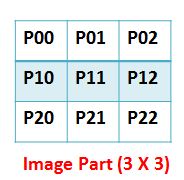
correlation is the process of adding each element of the image to its local neighbors by the weighted kernel. For better understanding, the part of image of size 3 x 3 has been taken as follows.
The correlation is the process of finding the sum of product of similar entries between the kernel and part of the image. Mathematically, it can be expressed as depicted in Equation 1.
In the resulting image, the element at coordinates [1,1] is updated with the resultant value of correlation as shown in Equation 1. This process is subsequently applied to find the rest of the values of elements in the resulting image as depicted in following.


Popular Articles:

1. matlab-cropping-binary-image-algorithm

Objective of the Program: Program takes a black and white image as input. It removes the black portion and gives the white portion of the image.

2. Working-with-ROI-of-image-using-Matlab

Objective of the Program:The part of the image, on which you have interest to work out, is called Region of Interest (ROI). In another words, selected subset of image is called ROI. In some contexts, you want to apply operations on ROI of image rather than the entire image. To achieve this, generally people extract the ROI from the image, store it in another variable and then apply operations on ROI. If you want to apply your operations on ROI without extracting from the image, it is bit difficult. This article will explain the performing the operations on ROI without extracting from the image. In this context, the ROI part of image is affected rather than the entire image.

Wednesday, February 21, 2018

Sobel-Edge-Detection

Sobel-Edge-Detection

If the reader does not know the convolution operation, click this link to understand the convolution operation in image processing: convolution.This article illustrates the how to implement Sobel edge detection without using predefined function. It is very simple to understand and implement. The function naveenSobelXgradient() calculates the horizontal derivative approximation and naveenSobelYgradient() calculates the vertical derivative approximation. Both these functions use the 3 x 3 kernels of Sobel edge detection as shown in following. The function naveenConvolve() do convolution operation between kernels and input image. After finding the X and Y gradients, the gradient magnitude is calculated using either [imgx2 + imgy2] or [abs(imgx) + abs(imgy)]. Here, imgx and imgy are X and Y gradients of given image img. We have used the latter one for calculating sobel edge detection. Python with openCV is used for reading the image file but sobel edge detection is done by the user defined function.

Sobel Kernels for Edge detection

Requirements for execution of code

  1. Python (numpy package)
  2. Opencv (Cv2 package)

Python Code

# Developer : M NAVEENKUMAR, a Research Scholar, Department of Computer Applications, NIT Trichy, Tamilnadu, India
# Objective of this program is to implement sobel edge detection without using Predefined functions.
import numpy as np
import cv2

#a function for convolution operation
def naveenConvolve(img,kernel):
    row1total = img[0,1]*kernel[0,1] + img[0,2]*kernel[0,2] + img[0,0]*kernel[0,0]
    row2total = 0
    row3total = img[2,1]*kernel[2,1] + img[2,2]*kernel[2,2] + img[2,0]*kernel[2,0]
    return row1total + row2total + row3total

#a function for taking part of image to apply convolution between kernel and part of image
def takePartImage(inpimg,i,j):
    image = np.zeros((3,3))
    a = i
    b = j
    for k in range(0,3):
        b = j
        for l in range(0,3):
            image[k,l] = inpimg[a,b]
            b = b+1
        a = a +1
    return image

#a function for finding X gradient
def naveenSobelXgradient(inputimg):
    rows = len(inputimg)
    cols = len(inputimg[0])
    Gx = np.array(np.mat('1 0 -1; 2 0 -2; 1 0 -1'))
    outputimg = np.zeros((rows,cols))
    for i in range(0,rows-3):
         for j in range(0,cols-3):
             # retreve the part of image of 3 x 3 dimension from inputimage
             image  = takePartImage (inputimg, i, j)
             outputimg[i,j] = naveenConvolve(image,Gx)
    return outputimg

#a function for finding Y gradient
def naveenSobelYgradient(inputimg):
    rows = len(inputimg)
    cols = len(inputimg[0])
    #print(rows,cols)
    Gy = np.array(np.mat('1 2 1; 0 0 0; -1 -2 -1'))
    outputimg = np.zeros((rows,cols))
    for i in range(0,rows-3):
         for j in range(0,cols-3):
             # retreve the part of image of 3 x 3 dimension from inputimage
             image  = takePartImage (inputimg, i, j)
             outputimg[i,j] = naveenConvolve(image,Gy)
    return outputimg

#reading an image 
inputimg = cv2.imread('Image path',0);

sobelimagex = naveenSobelXgradient(inputimg)
sobelimagey = naveenSobelYgradient(inputimg)

rows = len(inputimg)
cols = len(inputimg[0])

outputimg = np.zeros([rows, cols])

#finding the gradient magnitude by using the formula [abs(imgx) + abs(imgy)]
for i in range(0,rows):
    for j in range(0,cols):
        outputimg[i,j] = abs(sobelimagex[i, j]) + abs(sobelimagey[i, j])

print(outputimg.size)

cv2.imshow('sobel image',np.uint8(outputimg))
cv2.waitKey(0)

Output

Input image Sobel Output


Follow us on Facebook :


Popular Articles:

1. matlab-cropping-binary-image-algorithm

Objective of the Program: Program takes a black and white image as input. It removes the black portion and gives the white portion of the image.

2. Working-with-ROI-of-image-using-Matlab

Objective of the Program:The part of the image, on which you have interest to work out, is called Region of Interest (ROI). In another words, selected subset of image is called ROI. In some contexts, you want to apply operations on ROI of image rather than the entire image. To achieve this, generally people extract the ROI from the image, store it in another variable and then apply operations on ROI. If you want to apply your operations on ROI without extracting from the image, it is bit difficult. This article will explain the performing the operations on ROI without extracting from the image. In this context, the ROI part of image is affected rather than the entire image.

Friday, February 24, 2017

Datasets-Action-Recognition

Action Recognition: Datasets

Action Recognition is a computer vision task. The objective of the computer vision is to solve real world problems rather than the toy problems. Action Recognition has many real time applications such as human computer interaction, intelligent video surveillance and content based video retrieval etc. In this article, All publicly available datasets for action recognition is given with the download links. In addition, the fall detection and monitoring datasets are given. By studying this article, researchers will come to know the available datasets for action recognition.

In previous days, conventional (RGB) cameras were used for action recognition. The visible light cameras have many limitations such as lack of 3D information and suffering from severe illumination effects. When the low cost depth cameras like kinect available in the market, the research interest on action recognition has been increased using depth data. Hence, the datasets for action recognition using depth data have been in development for research purpose. This article gives the details of popular public available datasets for action recognition.

The following table will give details about the public available datasets for action recognition using depth data.
SNO Name Description No of actions No of Subjects Toal Sequences URL
(Download link)
1 MSR Action 3D

This dataset contains depth sequences pertaining to 20 actions, captured by kinect sensor. There are 10 subjects and each subject perform action two or three times and hence totally 567 depth sequences are produced. It is developed by Wanqing Li during his time at Microsoft Research Redmond. [Single View action dataset]

20 10 567 http://research.microsoft.com/en-us/um/people/zliu/actionrecorsrc/.
2 UTD Multimodel Human Action Dataset The description can be found in the link : "http://www.utdallas.edu/~kehtar/Kinect2DatasetReadme.pdf" 27 8 (4 male, 4 female) 861 http://www.utdallas.edu/~kehtar/Kinect2Dataset.zip
3 UTD Multiview Human Action Dataset The description can be found in the link : "http://www.utdallas.edu/~kehtar/MultiViewDataset.pdf" - - - http://www.utdallas.edu/~kehtar/MultiViewDataset.zip
4 Online RGBD Action Dataset (ORGBD) The description can be found in the link : "https://sites.google.com/site/skicyyu/orgbd" 7 - - https://sites.google.com/site/skicyyu/orgbd
5 UTKinect-Action3D dataset developed by University of Texas at Austin in 2012 10 10 - http://cvrc.ece.utexas.edu/KinectDatasets/HOJ3D.html
6 TST Fall detection dataset v1 The description can be found in the link : "http://www.tlc.dii.univpm.it/blog/databases4kinect#IDFall1" - 4 (AGE:26-27) - http://www.tlc.dii.univpm.it/blog/databases4kinect#IDFall1
7 TST Fall detection dataset v2 The description can be found in the link : "http://www.tlc.dii.univpm.it/blog/databases4kinect#IDFall2" - 11 (AGE:22-39) - http://www.tlc.dii.univpm.it/blog/databases4kinect#IDFall2
8 TST TUG dataset The description can be found in the link : "http://www.tlc.dii.univpm.it/blog/databases4kinect#IDTUG" - 20 (AGE:22-39) - http://www.tlc.dii.univpm.it/blog/databases4kinect#IDTUG
9 TST Intake Monitoring dataset v1 The description can be found in the link : "http://www.tlc.dii.univpm.it/blog/databases4kinect#IDFood" - 35 (AGE:22-39) - http://www.tlc.dii.univpm.it/blog/databases4kinect#IDFood
10 TST Intake Monitoring dataset v2 The description can be found in the link : "http://www.tlc.dii.univpm.it/blog/databases4kinect#IDFood2" - 20(AGE:23-41) - http://www.tlc.dii.univpm.it/blog/databases4kinect#IDFood2
11 RGBD-HuDaAct collected by Advanced Digital Sciences Center Singapore in 2011 12 30 - http://adsc.illinois.edu/sites/default/files/files/ADSC-RGBD-dataset-download-instructions.pdf
12 CAD-60 developed by Cornell University in 2011 12 4 - http://pr.cs.cornell.edu/humanactivities/data.php
13 MSRC-12 dataset(Kinect Gesture) developed by Microsoft Research Cambridge and University of Cambridge in 2012 - - - http://research.microsoft.com/en-us/um/cambridge/projects/msrc12/
14 G3D(Gaming 3D dataset) developed by Kingston University in 2012 20 10 - http://dipersec.king.ac.uk/G3D/
15 Depth-included Human Action video dataset (DHA) developed by CITI in Academia Sinica 23 21 - http://mclab.citi.sinica.edu.tw/dataset/dha/dha.html


Follow us on Facebook :


Popular Articles:

1. matlab-cropping-binary-image-algorithm

Objective of the Program: Program takes a black and white image as input. It removes the black portion and gives the white portion of the image.

2. Working-with-ROI-of-image-using-Matlab

Objective of the Program:The part of the image, on which you have interest to work out, is called Region of Interest (ROI). In another words, selected subset of image is called ROI. In some contexts, you want to apply operations on ROI of image rather than the entire image. To achieve this, generally people extract the ROI from the image, store it in another variable and then apply operations on ROI. If you want to apply your operations on ROI without extracting from the image, it is bit difficult. This article will explain the performing the operations on ROI without extracting from the image. In this context, the ROI part of image is affected rather than the entire image.

Wednesday, November 9, 2016

Convert-Video-to-Sequence-of-Frames

Convert-Video-to-Sequence-of-Frames

By studying this article, one can understand that how to read frame by frame from video using MATLAB.

Convert-Video-to-Sequence-of-Frames


% Program to read frames from a given video 

clear all; clc;
inputvideo = VideoReader('E:/videos/aa.mp4');

%informatin of video 
disp(inputvideo);

%number of frames in video 
no_of_frames = inputvideo.NumberOfFrames; 

%read and write operations frame by frame 
for i = 1 : no_of_frames
    
    frame = read(inputvideo,i);
    frame = rgb2gray(frame);
    strr = 'E:/videos/images/';
    str = int2str(i);
    filename = strcat(strr,'frame',str,'.jpg');
    imwrite(frame,filename,'BitDepth',8);
end


The output of the above code is shown below:

Summary of Multimedia Reader Object for 'aa.mp4'.

  Video Parameters:  29.93 frames per second, RGB24 1920x1080.
                     446 total video frames available.


Follow us on Facebook :


Tuesday, July 26, 2016

life-of-engineering-student

Foreword (by Developer of this blog) : I have been writing the articles to motivate young students for a couple of years. It is my passion to write articles related to inspirational and technical. One day, I asked my student to write an article about Life of an Engineering student in both aspects (academic and professional). As a result, she has written this wonderful article. I am thankful for her contribution to motivate the engineering buddies by this article. I hope that this article will give valuable suggestions to little buddies to get success in their life in both aspects(academic and professional).

Life of Engineering Student

I am writing this article to inspire and motivate the little engineering buddies. It depicts my insight about how I have completed the Engineering Graduation and entered into software company. It reveals facts behind the success story of a graduate student academically and professionally.
Lateefa B.Tech
Program Analyst
Cognizant Technology Solutions
Kochi, Kerala

So here is something that I always wrote of in my diary but now when I am asked to write about it to reach out to my juniors, I am falling short of words. College life is not as it is shown in movies there are perks to it as well pitfalls. On entering college each student finds a new freedom, one which they never had before. This blinds them in a way that most of them don’t realize the importance of being in one. College life has more to it than just fun and I know most would disagree. But truly there is a treasure of knowledge which most of us forget to cherish.

It’s the place where new ideas pop up, zeal to learn awaken our minds. College was where I found my apple of wisdom, I have learnt many lessons and here are a few interesting one for you guys. College has taught me the importance of knowledge and when I say that I mean not knowing but understanding what you learn. There will be many subjects and many extra-curricular activities but there should always be one particular thing that fascinates you the most. If you don’t have one its fine, you can end up being the jack of all trades. But at the end what matters is what knowledge you have gained and what have you taken from the 50 minutes lecture. Once a wise men (profoundly one of my dedicated lecturer in college) said “That no matter how bad a lecture is there will always be at least one new thing you could learn from it”.

When he told that to all my fellow classmates along with me none of us understood the depth of what it meant. But we later realized what he meant was there is always something to learn from a bad book or a bad lecture. In college you get the time to explore new stuff (no matter to which subject it be related to) and you get a practical experience of what you have learnt but this comes only when you put efforts. Hard work always pays of it has paid off for me. I was an average student in college, but enthusiastic enough to question and speak out what I felt and what concerned me it may be regarding subject or the way it was thought. You could only be confident later in important situations in life if you speak out your doubts and thoughts. College provide many opportunities for this. So be always enthusiastic to learn new things. College is the best place to get good genuine friends.

The first year of college is all basics like starters in your meal. Make sure you get your basics right because they are the foundation of what you are going to learn in the next three years of engineering life. Fall in love with coding if you are Computer Science student and non CS folks can also do it because coding is something that fascinates all. I still remember how happy I felt when I executes my first C program. The simple sentence “Hello world” displayed on the screen and made my day since then I never turned back. The more you learn the more excited it gets. It builds a hunger for coding. The happiness of finding a syntactical error that was stopping the entire code from being executed or the happiness in getting a bug fixed or executing your own piece of code (small or big) gives more pleasure. That’s what college gave me a new pleasure. The second important thing that each student should do is: true to yourself, study for yourself, do whatever you do, knowing how it would impact your future. Would it make a difference in life and if yes then think in a good way or in a bad way?

The ultimate goal is to get a job in campus selections for those who want to get into Software Industry. All the tests for 6 or 7 subjects, the labs, the practical exams, the mid exams, the scores, the late night studies and the external exams etc..... all for what? To secure a job in on campus placements, and this goal is realized by most of the students only at the end of third year of college. Then starts the cycle of aptitude learning, reasoning and English (RSWL) skills. It’s the first step towards clearing the initial screening or written exam. After you clear this, you will have to go through technical and HR round. For few MNCs, you will also have other rounds like group discussions, stress interviews etc.

A good preparation is required for this. The college arranges third party trainers to bloom the student in all these aspects including personality development. One should simply learn and practice what has been taught to them and coming to English, one can never master a language in a day, so the best way is to try to speak English with friends while in college, at least during English class. And reading books, no matter to which genre it belongs to, also improves the language skills.

And moving on to the actual experience in corporate life. At first all will be new, you will definitely feel as an outcast but trust me that’s how everyone feels when they are new. so, you are not an exception. You might not know what to do in the beginning and might end up making blunders in the project. You never take such things to heart. Though it would make you feel as a complete idiot, but it will pass. Stop blaming yourself and then one day you will laugh on these incidents. That will always remember that you couldn’t be a genius at the first day of your work.

“Remember It’s not how you fall that matters, what matters is how well you brush up yourself and get back up!!”


See also:
1. Article-on-research-for-phd-scholars
This article will be helpful to the students who want to join PhD and already joined PhD students.

Follow us on Facebook :


dealing-with-matrices-matlab

dealing-with-matrices-matlab

By reading this article, one can easily understand the working of Matrices in Matlab. In many cases,especially in the case of research, we need to perform operations on matrices. Matlab provides very simple commands (statements) for performing operations on matrices. This article explains different operations on matrices. In addition, it explains different operations on 3D arrays.

In Image Processing, an image can be considered as a matrix. The operations that can be performed on matrices, can also be applicable for images. Here, we explain the different matrix operations in image processing with neat diagrams.

creating 1D array

By simply assigning some values separated by commas within the square brackets to a variable, say 'a', 'a' is called a vector. Values in vector can be accessed by a(i). i varies from 1 to length of vector. Example is shown below.

creating 2D array (Matrix)

By simply assigning some values separated by commas and semicolons within the square brackets to a variable, say 'a', 'a' is called a Matrix. Values in Matrix can be accessed by a(i,j). i, j refers rows and columns of matrix. Example is shown below.
Follow us on Facebook :


Wednesday, July 20, 2016

image-gradients

Image Gradients

By studying this article, one can understand the meaning of image gradient and role of gradient values in edge detection. The gradient of pixel represents the change of the intensity values in both X and Y directions.

Gradient of image in X – Direction

  • The gradient of image in X-direction is calculated by computing change of each pixel with respect to X-direction.
  • Change of each pixel in X- direction is calculated as follows
    P(x, y) = P(x, y+1) – P(x, y-1) (right pixel – left pixel)
% Matlab program to find X-gradient image for the given image
clear all; clc;

%read a color image and convert it to gray
img = imread('E:images/face.jpg');
img = rgb2gray(img);
 
%find the size of image
[rows,cols] = size(img);
 
%converting image into double for performing operations
img=double(img);
 
%initialization xgradient matrix 'xgrad' with image 'img'
xgrad=img;
 
%calculating gradient image in X-direction
for i=1:rows
    for j=2:cols-1
        xgrad(i,j) = abs(img(i,j+1) - img(i,j-1));  
       
    end
end
 
 
figure, imshow(uint8(img)),title('given image');
figure, imshow(uint8(xgrad+22)), title('X-gradient image');

The output of the above code is shown below:

Gradient of image in Y – Direction

  • The gradient of image in Y-direction is calculated by computing change of each pixel with respect to Y-direction.
  • Change of each pixel in Y-direction is calculated as follows
    P(x, y) = P(x+1, y) – P(x-1, y) (upper pixel – lower pixel)
% Matlab program to find Y-gradient image for the given image
clear all; clc;

%read a color image and convert it to gray
img = imread('E:images/face.jpg');
img = rgb2gray(img);
 
%find the size of image
[rows,cols] = size(img);
 
%converting image into double for performing operations
img=double(img);
 
%initialization ygradient matrix 'ygrad' with image 'img'
ygrad=img;
 
%calculating gradient image in X-direction
for i=2:rows-1
    for j=1:cols
        ygrad(i,j) = abs(img(i+1,j) - img(i-1,j));  
       
    end
end
 
 
figure, imshow(uint8(img)),title('given image');
figure, imshow(uint8(ygrad+22)), title('Y-gradient image');

The output of the above code is shown below:

Popular Articles:

1. matlab-cropping-binary-image-algorithm

Objective of the Program: Program takes a black and white image as input. It removes the black portion and gives the white portion of the image.

2. Working-with-ROI-of-image-using-Matlab

Objective of the Program:The part of the image, on which you have interest to work out, is called Region of Interest (ROI). In another words, selected subset of image is called ROI. In some contexts, you want to apply operations on ROI of image rather than the entire image. To achieve this, generally people extract the ROI from the image, store it in another variable and then apply operations on ROI. If you want to apply your operations on ROI without extracting from the image, it is bit difficult. This article will explain the performing the operations on ROI without extracting from the image. In this context, the ROI part of image is affected rather than the entire image.

3. Insertion Sort Matlab Program:

Insertion sort is very simple algorithm and easy to implement. It works well when the input size is less. If the input size is more, insertion sort is not efficient(quick sort or merge sort works good when the input size is big).

Wednesday, July 13, 2016

reading-frames-from-video

reading-frames-from-video and store in cell arry

By studying this, one can understand the logic of reading frames from video and store them into cell array in matlab. I tested this program by using MATLAB 2012b. To run the following code, download the video using this link : download

%Matlab program to read frames from video and store all frames into a cell
%array.
% input -  path of the video
% output - cell array contains all frames in video


clear all; clc;
input = 'E:/videos/crosscut.avi';

%create object of videoReader
vid = VideoReader(input);

%find number of frames in video
no_of_frames = vid.NumberOfFrames;
fprintf('number of frames in video : %d \n', no_of_frames);

%create cell array with size of 'no_of_frames'
output = cell([1,no_of_frames]);

%read frame by frame and store it into a cell array 'output'
for i=1:no_of_frames
    frame = read(vid,i);
    output{i} = frame;
end

%convert all frames in cell array 'output' to gray color
for i=1:no_of_frames
    output{i} = rgb2gray(output{i});
end

%displaying all frames in cell arry 'output'
for i=1:6
    imshow(output{i});
    pause(0.1);
end


Output :

   number of frames in video : 100 

Popular Articles:

1. matlab-cropping-binary-image-algorithm

Objective of the Program: Program takes a black and white image as input. It removes the black portion and gives the white portion of the image.

2. Working-with-ROI-of-image-using-Matlab

Objective of the Program:The part of the image, on which you have interest to work out, is called Region of Interest (ROI). In another words, selected subset of image is called ROI. In some contexts, you want to apply operations on ROI of image rather than the entire image. To achieve this, generally people extract the ROI from the image, store it in another variable and then apply operations on ROI. If you want to apply your operations on ROI without extracting from the image, it is bit difficult. This article will explain the performing the operations on ROI without extracting from the image. In this context, the ROI part of image is affected rather than the entire image.

3. Insertion Sort Matlab Program:

Insertion sort is very simple algorithm and easy to implement. It works well when the input size is less. If the input size is more, insertion sort is not efficient(quick sort or merge sort works good when the input size is big).

Tuesday, July 12, 2016

Insertion-sort

Insertion Sort Matlab Program

By studying this, one can understand the logic of insertion sort. Insertion sort is very simple algorithm and easy to implement. It works well when the input size is less. If the input size is more, insertion sort is not efficient(quick sort or merge sort works good when the input size is big).

% Program for Insertion sort 
% Author : M Naveenkumar , Research Scholar , NIT Trichy, Tamilnadu, India
% n = input size (array size)

clear all; clc;
n = input('Enter n value:');

% create an array (a) with size 'n' and filled with zeros
a(1,n)=0;

% reading 'n' values to array (a)
for i=1:n
    string = 'value:';
    a(1,i) = input(string);
end

disp ('_______________________________________________________________');

for j=2:n
    key = a(1,j);
    
    % insert 'key' into already sorted array a[1.... j-1]
    i = j-1;
    while (i>0 && a(1,i)> key) 
        a(1,i+1) = a(i);
        i = i-1;
    end 
    a(1,i+1) = key;
    
    disp ('.................................................');
    fprintf('At j =%d:\n',j);
    disp(a);
end

disp ('_______________________________________________________________');
disp('sorted elements:');
disp(a);

Output :


Enter n value:6
value:2
value:1
value:9
value:5
value:7
value:8
_______________________________________________________________
.................................................
At j =2:
     1     2     9     5     7     8

.................................................
At j =3:
     1     2     9     5     7     8

.................................................
At j =4:
     1     2     5     9     7     8

.................................................
At j =5:
     1     2     5     7     9     8

.................................................
At j =6:
     1     2     5     7     8     9

_______________________________________________________________
sorted elements:
     1     2     5     7     8     9


Popular Articles:

1. matlab-cropping-binary-image-algorithm

Objective of the Program: Program takes a black and white image as input. It removes the black portion and gives the white portion of the image.

2. Working-with-ROI-of-image-using-Matlab

Objective of the Program:The part of the image, on which you have interest to work out, is called Region of Interest (ROI). In another words, selected subset of image is called ROI. In some contexts, you want to apply operations on ROI of image rather than the entire image. To achieve this, generally people extract the ROI from the image, store it in another variable and then apply operations on ROI. If you want to apply your operations on ROI without extracting from the image, it is bit difficult. This article will explain the performing the operations on ROI without extracting from the image. In this context, the ROI part of image is affected rather than the entire image.

Thursday, April 7, 2016

Attaching-Two-Images-side-by-side-Matlab-Program

Attaching Two Images side by side Matlab Program

By studying this article, one can understand the logic of attaching two images side by side by using Matlab. This logic is not only applicable for gray scale images but also for color images without converting them into gray scale. Matlab is very useful and easy tool for image processing. Most of the researchers use Matlab for their research.

Method 1: (using black border at the bottom) Among two images, the less height of the image is found and its height is increased by padding zeros so that the heights of two images are equal. Hence the black border is added at the bottom of the less height image.

% read images (two)
    image1 =  imread('E:/images/image1.jpg');
    image2 =  imread('E:/images/image2.jpg');

% find the less height image(row size is less) and increase the height by filling zeros
    rows1 = size(image1,1);
    rows2 = size(image2,1);
    if (rows1 < rows2)
        image1(rows2,1) = 0;
    else
        image2(rows1,1) = 0;
    end

% Now append both images side-by-side.
    image = [image1 image2];
    imshow(image);

Input: (Two images)
image1.jpg image2.jpg
Output: (after Attaching images)

Method 2: (without using black border at the bottom)

% read images(two)
    image1 =  imread('E:/images/image1.jpg');
    image2 =  imread('E:/images/image2.jpg');
    
% find the less height image(row size is less) and increase the height by
% using imresize function
    rows1 = size(image1,1);
    rows2 = size(image2,1);

    if (rows1 < rows2)
        image1= imresize(image1,[rows2,size(image1,2)]);
    else
        image2= imresize(image2,[rows1,size(image2,2)]);
    end
% Now append both images side-by-side.
    image = [image1 image2];
    imshow(image);

Input: (Two images) Same as Two images image1.jpg, image2.jpg Output: (after Attaching images)


See also:

1. matlab-cropping-binary-image-algorithm

Objective of the Program: Program takes a black and white image as input. It removes the black portion and gives the white portion of the image.

2. Working-with-ROI-of-image-using-Matlab

Objective of the Program:The part of the image, on which you have interest to work out, is called Region of Interest (ROI). In another words, selected subset of image is called ROI. In some contexts, you want to apply operations on ROI of image rather than the entire image. To achieve this, generally people extract the ROI from the image, store it in another variable and then apply operations on ROI. If you want to apply your operations on ROI without extracting from the image, it is bit difficult. This article will explain the performing the operations on ROI without extracting from the image. In this context, the ROI part of image is affected rather than the entire image.

Wednesday, March 30, 2016

Working-with-ROI-of-image-using-Matlab

Working with ROI of image using Matlab

M Saravana Mathan MCA
Project Associate
NIT Trichy

The part of the image, on which you have interest to work out, is called Region of Interest (ROI). In another words, selected subset of image is called ROI. In some contexts, you want to apply operations on ROI of image rather than the entire image. To achieve this, generally people extract the ROI from the image, store it in another variable and then apply operations on ROI. If you want to apply your operations on ROI without extracting from the image, it is bit difficult.

I am writing this article to explain the performing the operations on ROI without extracting from the image. In this context, the ROI part of image is affected rather than the entire image.

For example, you want to apply edge detection algorithm on the half of image (example: top of image), study the following example. Let consider the image as shown below.

Here ROI = "Half (Top) of the Image"

% read input image
img=imread('E:/images/input.jpg');

% convert color to gray image if input is color image
img=rgb2gray(img);
subplot(1,3,1);
imshow(img), title('Input image');

% calculating size of the image
[rows,cols]=size(img);
rows = rows/2;

% Apply Canny edge operation
edgeimg=edge(img(1:rows,1:cols),'Canny');
subplot(1,3,2);
imshow(edgeimg), title('Canny operation on Extracted ROI');

% calculating size of the ROI
[row,col]= size(edgeimg);

% edgeimg is in logical values (0,1). converting edgeimg into grayimage
edgeimg=uint8(edgeimg);
for i= 1:row 
     for j=1:col
         if(edgeimg(i,j)==1)
             edgeimg(i,j)=255;
         end
     end
end

% substituting Extracted ROI in Input image
img(1:rows,1:cols)=edgeimg;

subplot(1,3,3);
imshow(img), title('Input Image after substituing ROI');

output:


See also:

1. matlab-cropping-binary-image-algorithm

Objective of the Program: Program takes a black and white image as input. It removes the black portion and gives the white portion of the image.

Tuesday, February 23, 2016

Matlab-Cropping-binary-image-algorithm-and-program

Matlab

Program for Cropping Binary Image : Matlab Code

Objective of the Program:


Program takes a black and white image as input. It removes the black portion and gives the white portion of the image.

Input: Gray or binary image (for example consider the image below)


Output: Gray or binary image (as below)


MATLAB Code:


% read the input binary image 

img = imread('path of image');

% calculating size of the image 

[row col] = size(img);

% removing black portion on top side of the image 
  for i = 1:row
    if sum(img(i,:)) > 0
        top = i;
        break
    end
  end

% removing black portion on bottom side of the image 
  for i = row:(-1):1
    if sum(img(i,:)) > 0
        bottom = i;
        break
    end
  end

% removing black portion on left side of the image 
  for i = 1:col
    if sum(img(:,i)) > 0
        left = i;
        break
    end
  end

% removing black portion on right side of the image 
  for i = col:(-1):1
    if sum(img(:,i)) > 0
        right = i;
        break
    end
  end

% output image  
 output = img(top:bottom, left:right);

 imshow(output);


Popular Articles:

1. matlab-cropping-binary-image-algorithm

Objective of the Program: Program takes a black and white image as input. It removes the black portion and gives the white portion of the image.

Tuesday, February 16, 2016

Article-on-Research-for-PhD-Scholars

Article on Research for PhD scholars

We are writing this article to motivate research scholars with our little research experience. We hope this article will be helpful to the students who want to join PhD and already joined PhD students.


What is PhD?

  • According to Prakash Iyer, PHD stands for Passion, Hunger and Discipline. He says that in order to be successful in life, one needs to be Passionate about what one wants, have a Hunger to work for it and the Discipline to keep up the work even in the face of adversity.
  • Every one needs PHD to get success in his/her life. (here PHd means Passion, Hunger and Discipline but not a qualification degree i.e Doctorate of Philosophy)
  • When we observe the great persons in the world, all have PHD(Passion, Hunger, Discipline) but not have PhD (Doctorate of Philosophy).
  • There are many evidences to show that winning and being successful in life has little to do with academic qualifications.
    Passion :
    • Do you enjoy what you do? Do you love your work?
    • Passion makes you get out of your bed early morning and get to work to achieve your goals. Not because you have to, but because you love to
    • Passion makes you enjoy the every moment even you are working a long hours for a day. Remember Great things are not achieved through better resources but with passion.
    • Martin Luther King once said: "If a man is called to be a street sweeper, he should sweep streets just as Michelangelo painted, or Beethoven composed music, or Shakespeare wrote poetry. He should sweep streets so well that all the hosts of heaven and earth will pause to say, here lived a great street sweeper who did his job well."
    • Conclusion : It is important to love what you are doing
    Hunger :
    • Are you really hungry for getting success?
    • we are explaining the need for hunger with a little story:
    • story : one day a young man went to Socrates and said he wanted to get wisdom. "Come with me," said Socrates and took him along to a river. Without any warning, Socrates pushed the man's head under water and held it there. The man did not know what was happening. He struggled for air. He moved his head, flailed his hands desperately seeking to get his head above water for some air. Socrates finally let go and asked him, "What did you want when your head was under water?" "I wanted air," said the man. "Right," said Socrates, "When you want wisdom as badly as you wanted the air -- you will get it!"
    • Conclusion : Passion with hunger is needed to get success in life. (only passion is not enough)
    Discipline :
    • Once you have the passion with hunger, you can achieve success in your life. But to keep on doing right things, time after time after time, one need discipline.
    • Success demands discipline. Commit yourself to become a PhD. A Passionate, Hungry, Disciplined person. Success always calls you.

Conclusion : We are Concluding the article by saying that "A person who want to get (degree) Ph.D (Doctorate of Philosophy) needs PHD (Passion,Hunger and Discipline)".


Follow us on Facebook :


Tuesday, August 11, 2015

top-ten-universities-in-the-world

Quote of the Day


Don't Wait for the perfect moment, take the moment and make it perfect


Articles By Great People


Top Universities in the world for the year 2014-15

According to the times higher education world, the top 10 universities in the world are as follows:

Rank University Country
1 Caltech USA
2 Harward USA
3 Oxford UK
4 Stanford USA
5 Cambridge UK
6 MIT USA
7 Princeton USA
8 California,berkely USA
9 Imperial College UK
9 Yale USA


According to the times higher education world, The top indian educational institutions (IISc,IITs) got the following ranks in the world.

Rank University Country
276-300 IISc Bangalore India
351-400 IIT ROORKEE India
351-400 IIT BOMBAY India

Tuesday, March 31, 2015

Career-at-after-Btech

Career @ after BTech

The students, who are studying BTech final year, don't know about what are the opportunities after completion of BTech. Many of the students are wasting their valuable time after completion of B.Tech due to lack of knowledge on career opportunities.

MTech

This is the Post Graduation Course. After completion of MTech in any national institution, more job opportunities are there. To join M.Tech in national level institution, one has to qualify GATE exam.

Sunday, December 14, 2014

Converting word file (.doc) to different formats using MS OFFICE 2010

Converting a word file to different formats using MS OFFICE 2010 ( in windows)

MS Office 2010 allows the user to convert a word file in to 16 different formats. Even though many of the people using MS Office , they don't know how many ways they can convert a word (.doc) format to different formats without using any online applications.

Even they are using MS Office 2010, many of the people use online converters for converting .doc to .pdf (due to lack of knowledge on MS Word 2010)

We can convert a .doc into 16 different formats as following

Friday, December 5, 2014

Project Work at Engineering

Project Work @Engineering

As the part of B.Tech (or M.Tech), It is necessary to do a project as a partial fulfillment for the award of engineering degree. Many of the B.Tech(M.Tech) Final year students are in confusion to choose interesting area for doing project work. In olden days, Engineering colleges encourages students to develop application projects like Library application, online reservation system etc.

Now, many engineering colleges encourages students to do IEEE Projects. As the part of IEEE Project, students have to choose their interesting area, search the IEEE papers in their area and simulate(or implement) the work in IEEE paper. By doing the project, students get to know their abilities and weaknesses so that they can improve further.The following are the list of topics for doing project work. 
  1. Wireless Sensor Networks
  2. Data Mining
  3. Cloud Computing
  4. Mobile Compuring
  5. Network Security
  6. Artificial Intelligence
  7. Software Engineering
  8. Software Testing
  9. Data Base Systems
  10. Computer Networks
  11. Grid Computing
  12. Computer Architecture
  13. Distributed Systems
  14. Operating Systems
  15. Theory of Computer Science
  16. Programming languages (Design, implementation)
  17. Graphics
  18. Image Processing
  19. Mobile Adhoc Networks (MANETs)
  20. Web Mining
  21. Machine Learning
  22. Bio Metrics
  23. Expert Systems

Related Posts:

Learning PhP online

Do want to become a good PhP Developer (using online study material)?

PhP is a scripting language, used to create a dynamic and interactive web pages. It is widely used and efficient alternative for Microsoft's ASP or JSP.

If you want to learn php, many online tutorials are available. The following are the good websites to learn php online.

If you want to become a good php developer, you have to thoroughly understand the following concepts in addition to php.

  • PhP framework (ex: Zend framework)
  • MYSQL (one type of DBMS )
  • CSS
  • JQUERY

Python-environment-for-deep-learning-in-windows

Python is increasingly becoming a popular programming language for machine learning and deep learning. If you want to use python for train...